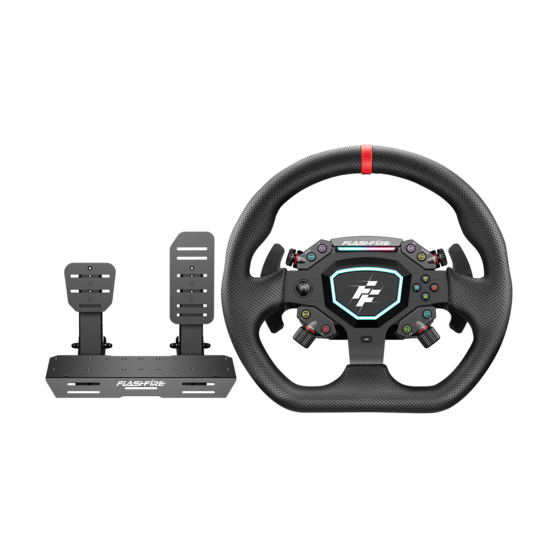
G103 3.2Nm Direct Drive Wheel Compatibility FAQ
- 2026
- 07
- 20
Wondering which games are compatible with the G103? We've got you covered.
Whether you're into circuit racing, rally, drifting, or truck simulators, the FlashFire G103 3.2Nm Direct Drive Wheel supports a wide range of popular racing titles. This guide includes the latest PC, Ps4 and Xbox compatibility list, along with answers to common questions about Force Feedback (FFB), game setup, and compatibility, so you can get on the track with confidence and enjoy a smoother, more immersive driving experience.
Q1 | Which platforms does the FlashFire G103 support?
The FlashFire G103 3.2Nm Direct Drive Wheel currently supports:
- Windows PC
- Xbox Series X|S & Xbox One
- PS4
This page focuses on game compatibility for PC, Ps4 and Xbox to help you quickly check supported titles.
Q2 | Which racing games are compatible with the FlashFire G103?
The FlashFire G103 has been tested with a wide range of popular racing titles, including:
- Forza Horizon Series
- Forza Motorsport
- Assetto Corsa
- Assetto Corsa Competizione (ACC)
- EA SPORTS WRC
- F1 Series
- DiRT Rally 2.0
- Euro Truck Simulator 2
- American Truck Simulator
- BeamNG.drive
- Project CARS
- iRacing
- RaceRoom Racing Experience
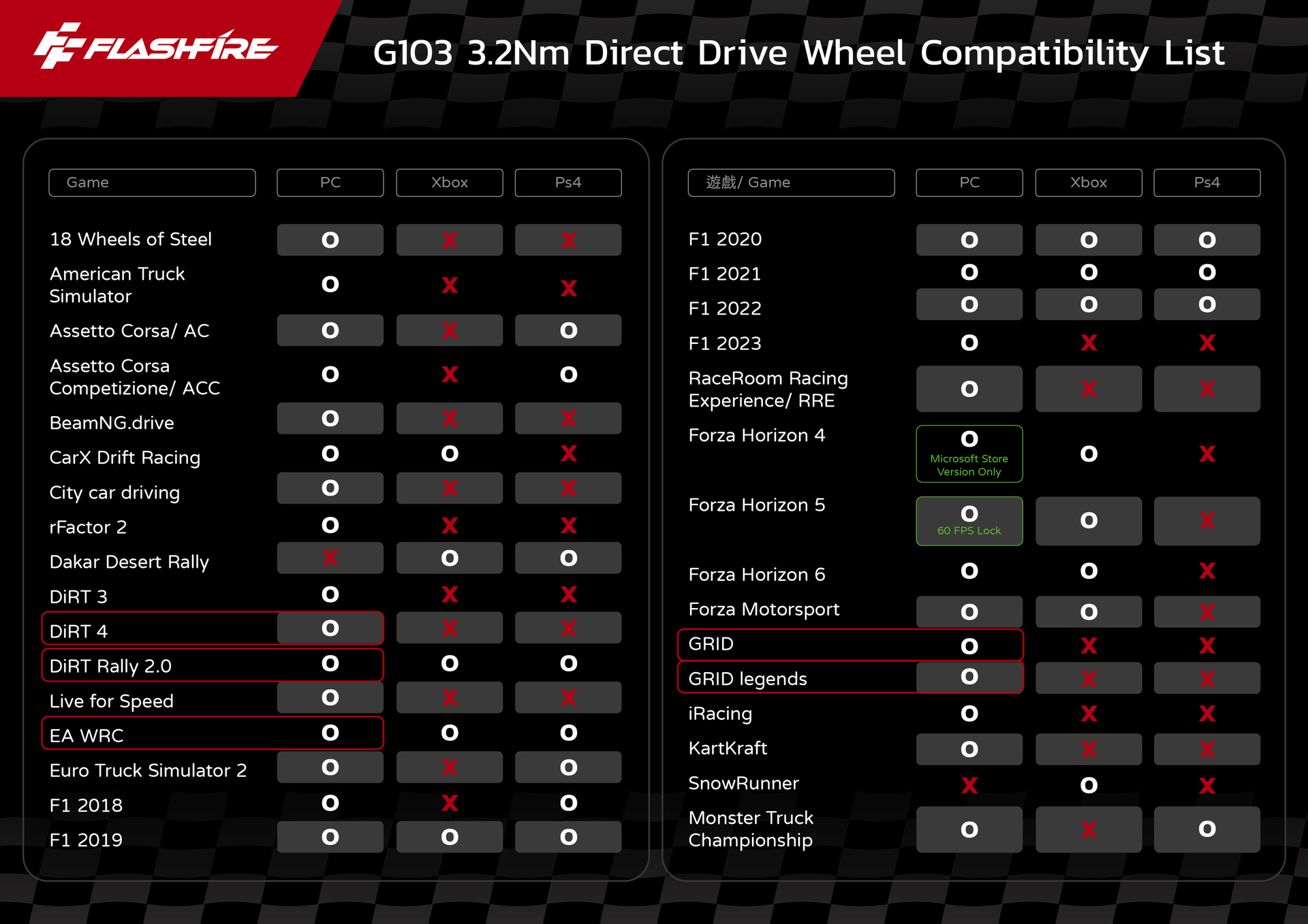
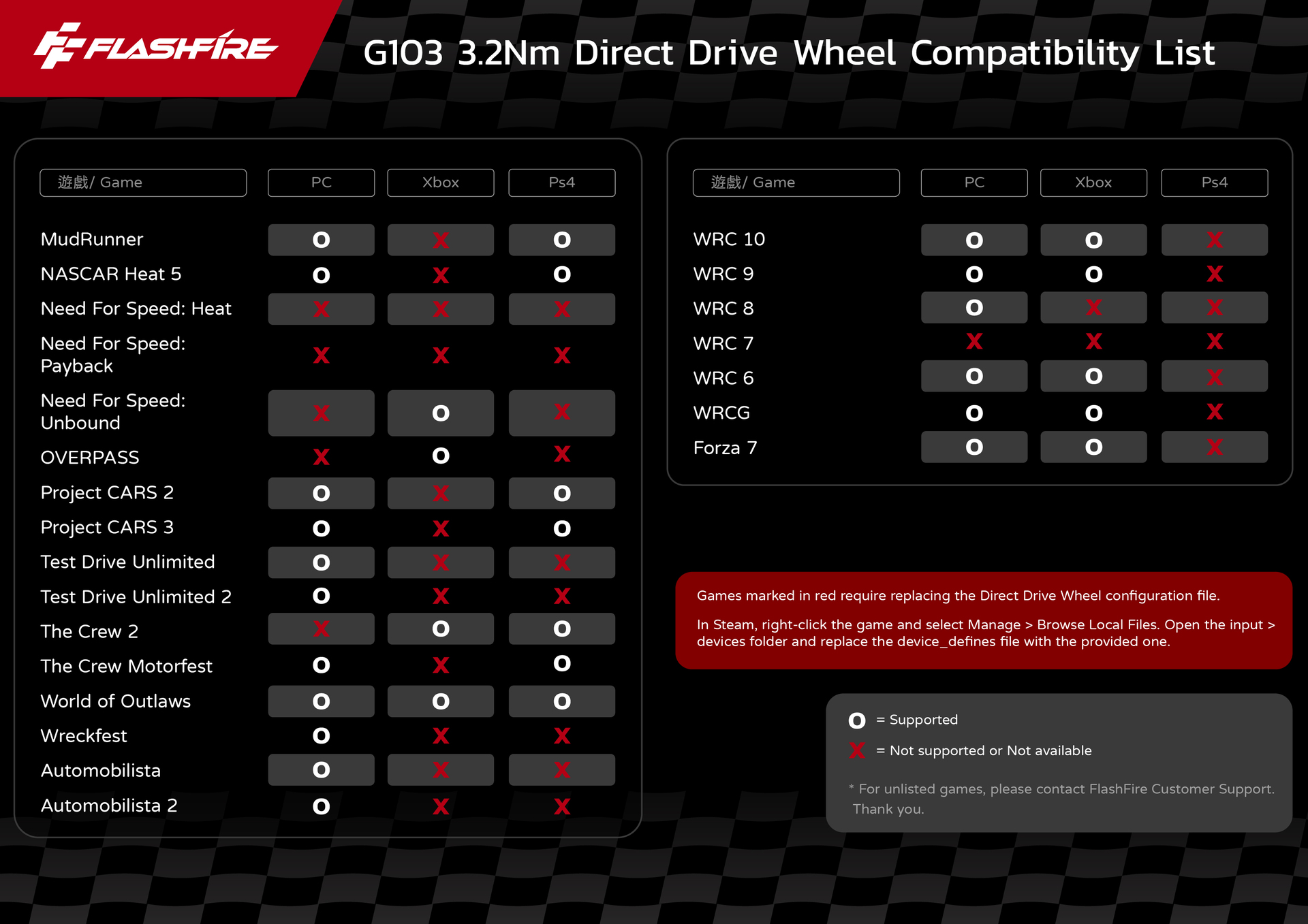
Please refer to the compatibility chart above for detailed platform support. We'll continue testing additional titles and keep this page up to date.
Q3 | Why does a game work on PC but not on Ps4/Xbox?
This is a common question among sim racing enthusiasts.
Game compatibility depends not only on the hardware, but also on whether the game developer officially supports steering wheels on each platform. As a result, the same game may support the G103 on PC but not on Ps4/Xbox.
For the latest compatibility information, please refer to the game compatibility list on this page. We regularly update it as new test results become available.
Q4 | What do the games highlighted in red on the compatibility chart mean?
Games highlighted in red require the installation of the G103 Device Profile.
Some games were released before native support for the G103 was available. Installing the official Device Profile allows the game to recognize the wheel correctly and enables full functionality.
For installation instructions, please follow the setup guide provided by FlashFire.
Q5 | What is Force Feedback (FFB)?
Force Feedback (FFB) recreates the forces you would feel while driving by sending feedback from the game directly to the steering wheel.
Whether you're driving over uneven road surfaces, cornering, losing traction, or making contact with another vehicle, FFB lets you feel these events in real time for a more realistic driving experience.
Powered by Direct Drive technology, the G103 delivers more precise, responsive, and detailed force feedback than conventional gear- or belt-driven wheels, providing a more immersive racing experience.
Q6 | What should I do if the wheel works but Force Feedback (FFB) doesn't?
If steering and buttons work normally but Force Feedback is not functioning, please check the following:
- Make sure you have installed the latest firmware and driver.
- Confirm that the game supports Force Feedback for the G103.
- Verify that Force Feedback is enabled in the game's settings.
- Check whether the game requires the G103 Device Profile (games highlighted in red).
In most cases, Force Feedback should work properly after completing the steps above.
Q7 | If my game isn't listed, does that mean it's not supported?
Not necessarily.
If your game doesn't appear on the compatibility list, it may be because:
- Compatibility testing has not yet been completed.
- The game does not officially support steering wheels.
- Compatibility with the G103 has not yet been verified.
If you'd like to check compatibility for a specific game, feel free to contact the FlashFire support team. We'll be happy to help verify the latest compatibility status.
Q8 | Will the game compatibility list be updated?
Yes.
FlashFire continuously tests newly released racing games, game updates, and firmware compatibility to ensure the information on this page stays current.
If the game you're looking for isn't listed yet, feel free to contact the FlashFire support team for the latest compatibility information.