F107 Imola racing Wheel Compatibility List
- 2026
- 08
- 05
Wondering Which Games the F107 IMOLA Supports? We've Got You Covered!
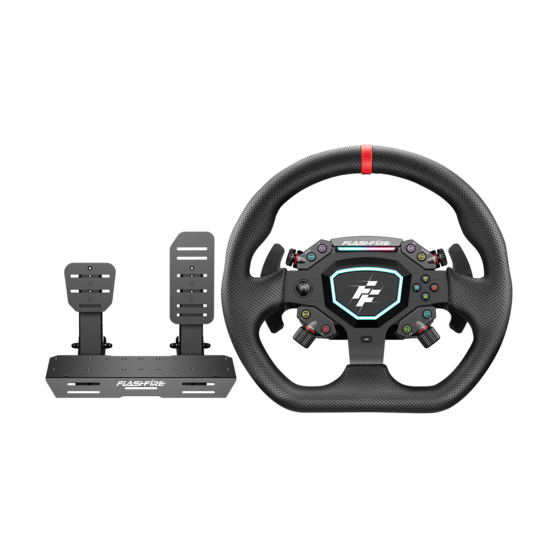
Whether you're into Formula racing, circuit racing, rally, drifting, or truck simulators, the FlashFire F107 IMOLA Force Feedback Racing Wheel supports a wide range of popular racing titles.
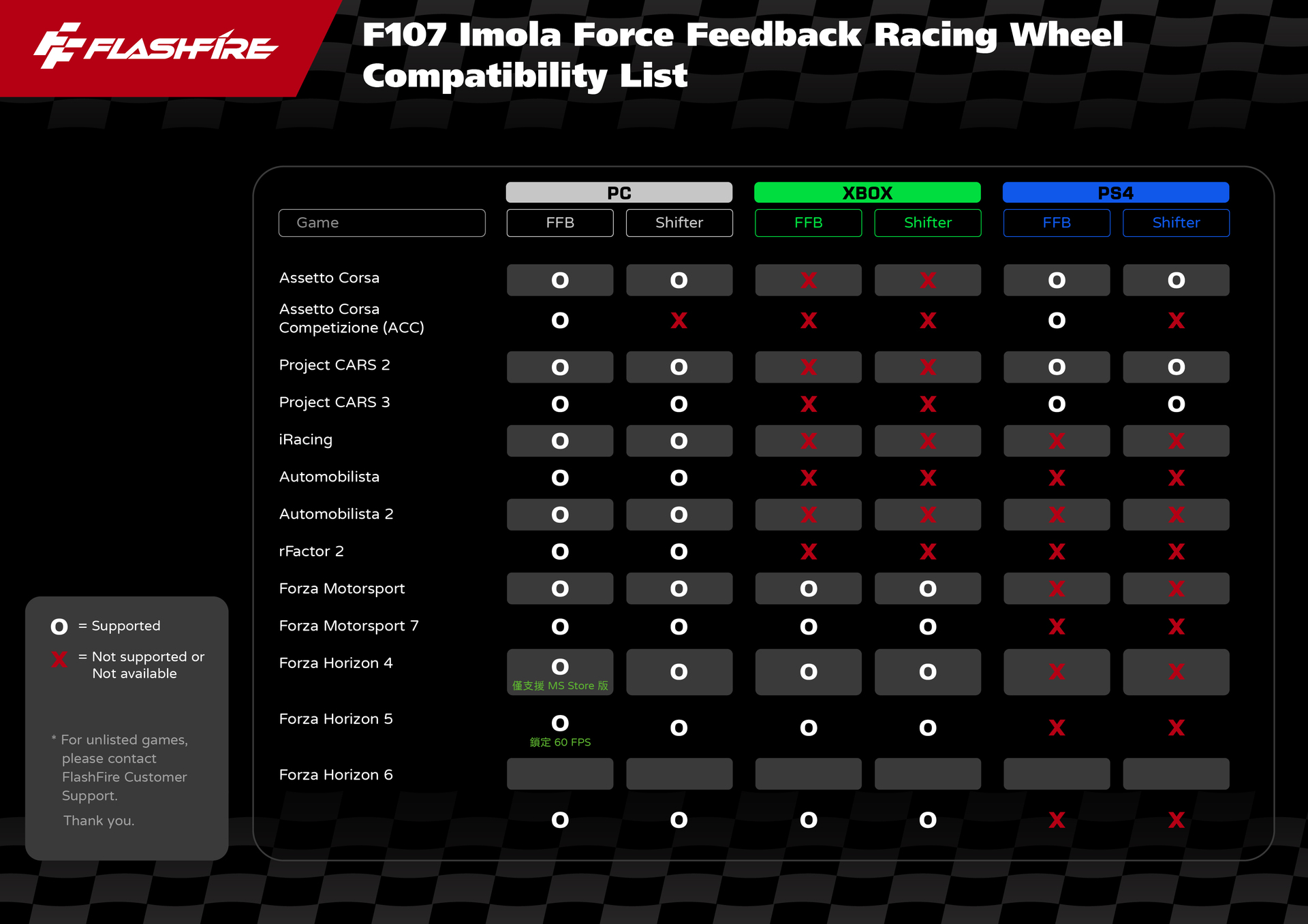
This guide includes the latest game compatibility list for PC, Xbox, and PS4, along with answers to the most common questions about Force Feedback (FFB), game settings, and compatibility. Check everything before you hit the track and enjoy a smoother, more immersive racing experience.
Q1 | Which platforms does the F107 IMOLA support?
The FlashFire F107 IMOLA Force Feedback Racing Wheel currently supports:
- Windows PC
- Xbox Series X|S
- Xbox One
- PS4
* Supported games, Force Feedback (FFB), and shifter compatibility may vary depending on the platform. We recommend checking the latest F107 IMOLA Game Compatibility List before you start playing.
Q2 | Which racing games are compatible with the F107 IMOLA?
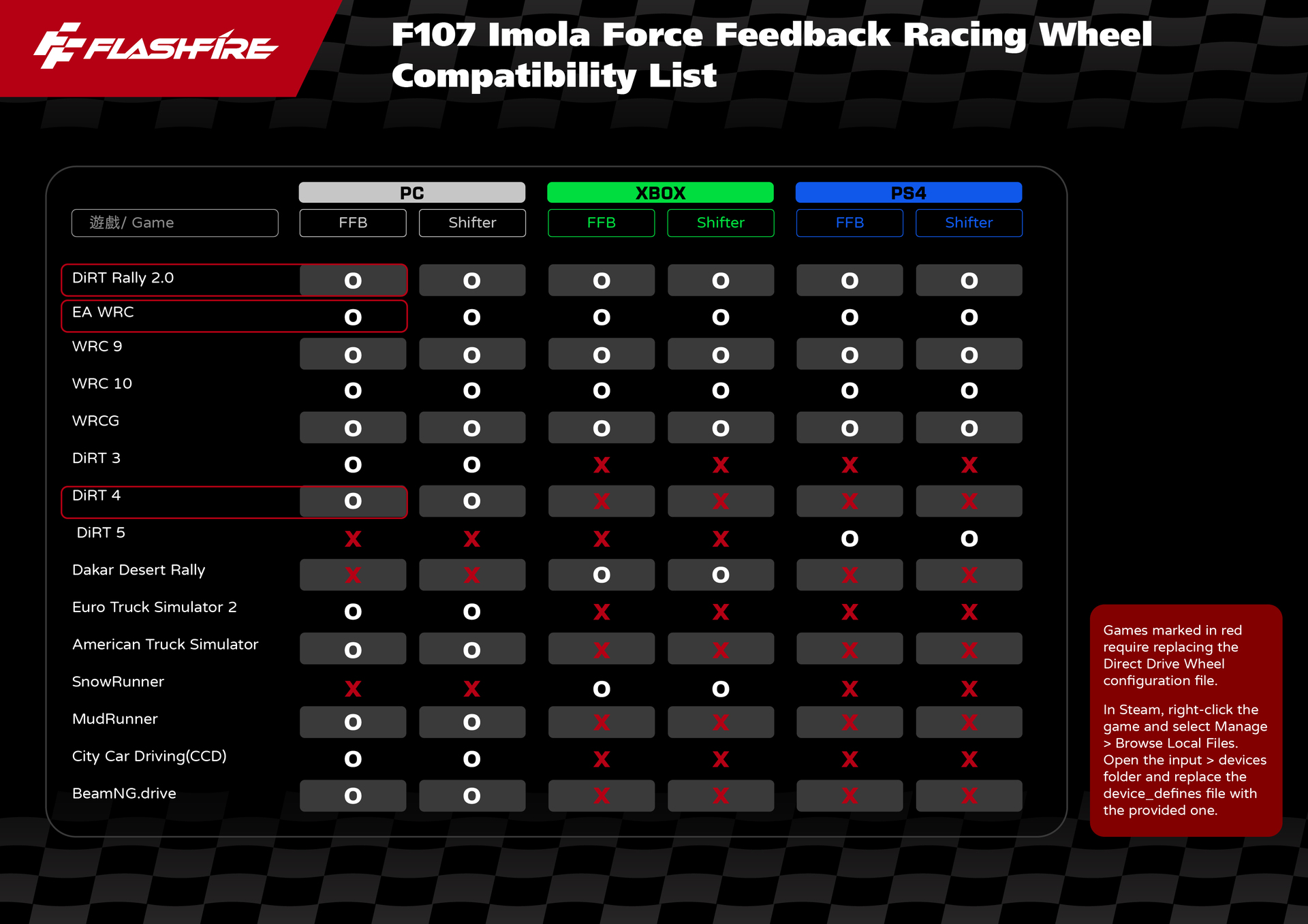
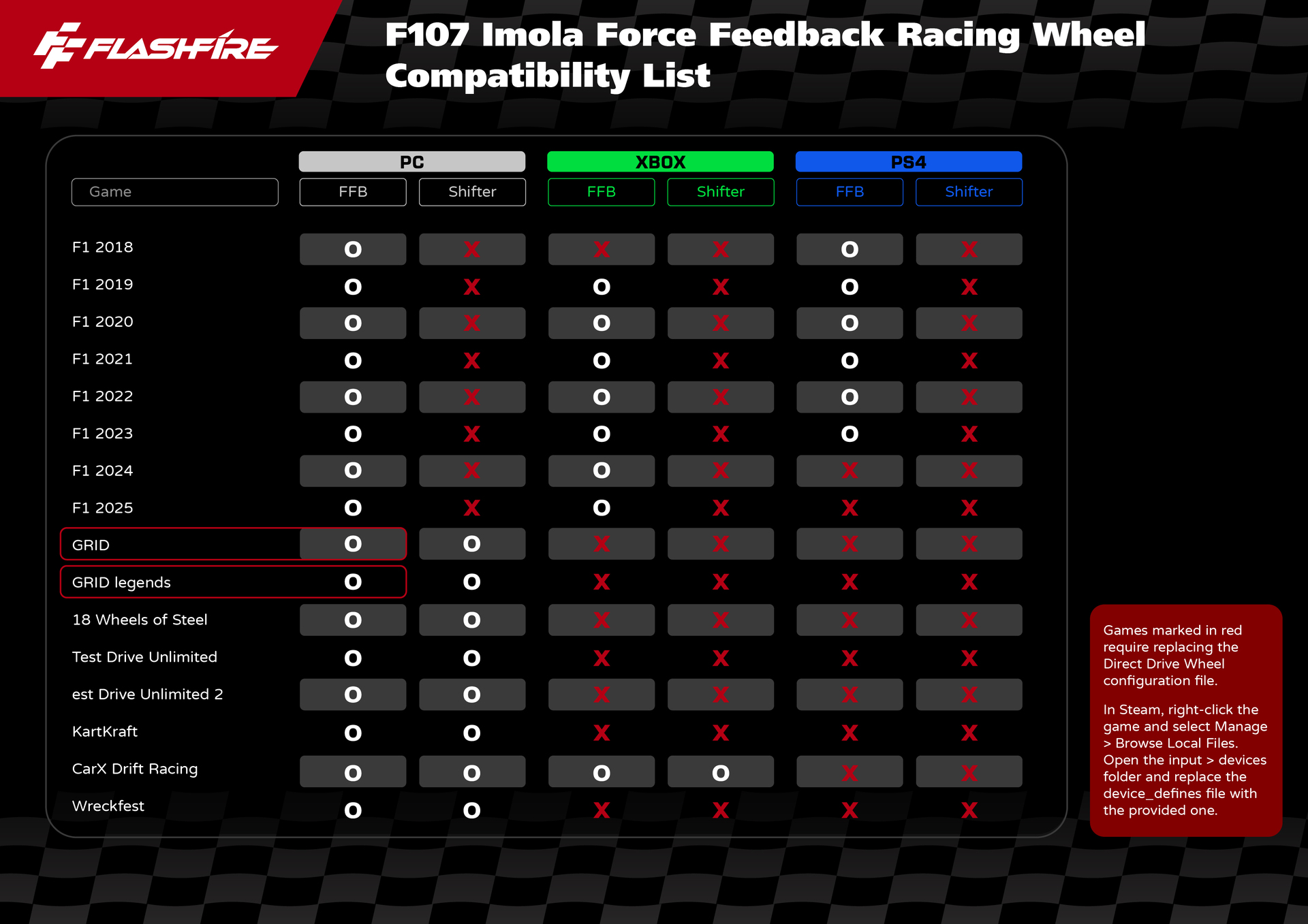
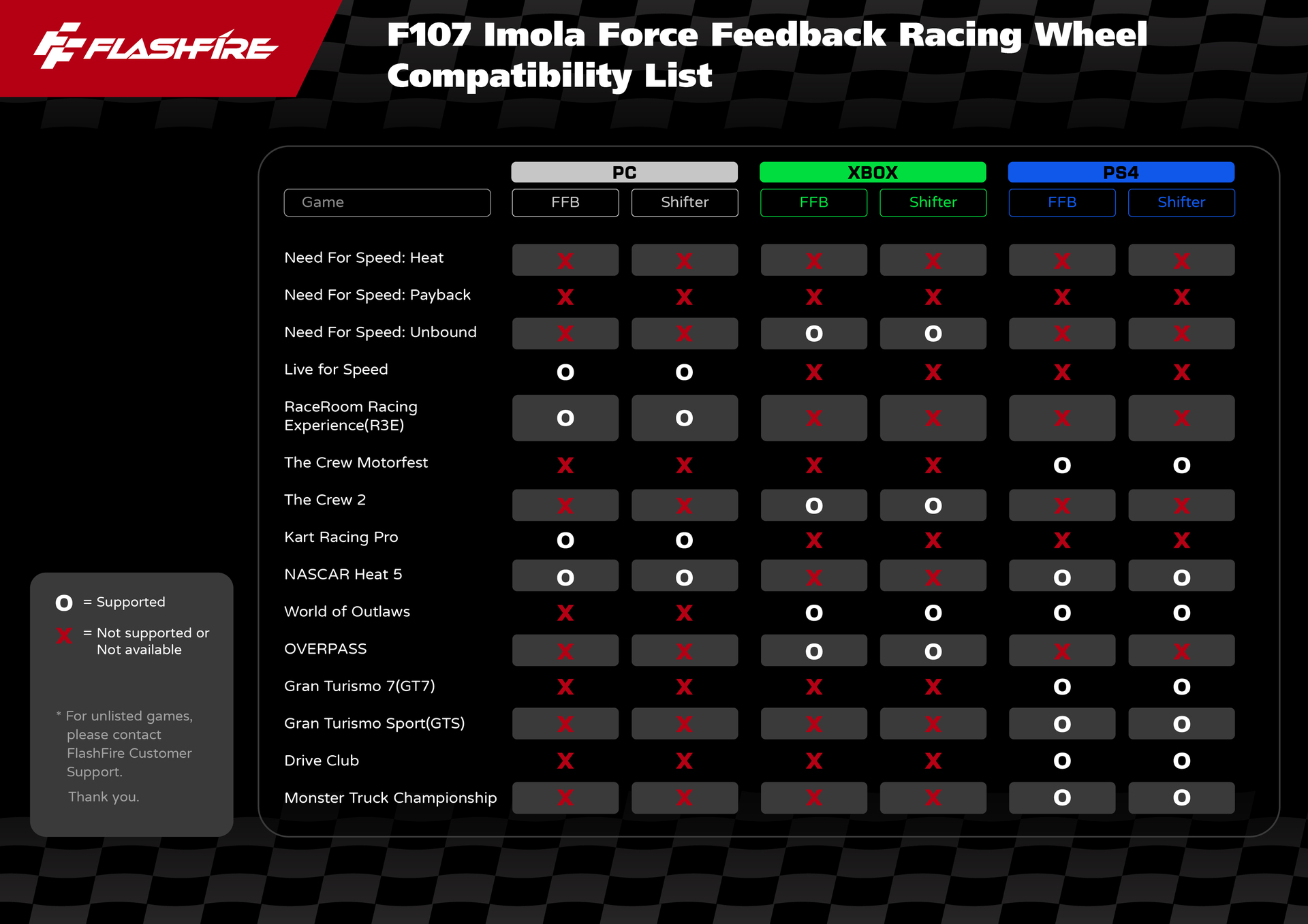
The F107 IMOLA has been tested with many popular racing titles, including:
- Assetto Corsa
- Forza Motorsport
- Forza Horizon Series
- EA SPORTS WRC
- DiRT Rally 2.0
- Project CARS
- Euro Truck Simulator 2
- Gran Turismo
- F1 Series
* We're continuously testing more games and updating the official compatibility list so you can quickly check the latest supported titles.
Q3 | Why does a game work on PC but not on Xbox or PS4?
This is a common question among racing wheel users.
Game compatibility depends not only on the hardware itself, but also on whether the game developer officially supports racing wheels on each platform. As a result, the same game may offer different levels of support on PC, Xbox, and PS4.
In some cases, a game may support steering input but not Force Feedback (FFB) or external shifters.
For the latest compatibility information, please refer to the F107 IMOLA Game Compatibility List, which we update regularly.
Q4 | What do the games highlighted in red mean?
Games highlighted in red require you to replace the F107 IMOLA Device Defines file.
Some games were released before the F107 IMOLA was officially supported, so they don't include the correct device profile by default. Replacing the provided configuration file allows the game to recognize the wheel correctly and enables full functionality.
Simply follow the official setup guide, and you'll be ready to race.
Q5 | What is Force Feedback (FFB)?
Force Feedback (FFB) is the feature that lets you actually feel what the car is doing.
As you drive over curbs, rough roads, corners, slides, or collisions, the game sends those forces back through the steering wheel, giving you real-time feedback from the road and the vehicle.
With Force Feedback, you're not just steering—you can feel changes in grip, steering weight, and vehicle behavior, creating a much more realistic and immersive driving experience.
Q6 | My steering wheel works, but there's no Force Feedback (FFB). What should I do?
If the wheel controls the game normally but Force Feedback isn't working, don't worry. Check the following:
- Make sure you've installed the latest driver and firmware.
- Confirm that the game supports Force Feedback on the F107 IMOLA.
- Verify that Force Feedback is enabled in the game's settings.
- Check whether the game requires the Device Defines file (games marked in red).
After completing these steps, Force Feedback should work correctly in most cases.
Q7 | What does the "Shifter" column mean?
The Shifter column indicates whether the game supports an external gear shifter.
Because support depends on each game's design, not every title that supports the steering wheel will also support manual shifting.
If you'd like to race with an H-pattern shifter, check the Shifter column in the compatibility list before playing.
Q8 | I can't find my game in the compatibility list. Does that mean the F107 IMOLA doesn't support it?
Not necessarily.
If a game isn't listed yet, it may be because:
- Compatibility testing hasn't been completed.
- The game doesn't officially support racing wheels.
- Compatibility with the F107 IMOLA hasn't been verified yet.
If you'd like to check support for a specific game, please contact FlashFire Customer Support, and we'll be happy to provide the latest testing results.
Q9 | Will the F107 IMOLA Game Compatibility List be updated?
Yes.
As new racing games are released, existing games receive updates, and we receive feedback from players, FlashFire will continue testing compatibility and updating the F107 IMOLA Game Compatibility List.
If there's a game you'd like us to test, feel free to contact our customer support team. We'll continue expanding compatibility to provide the best possible racing experience.
Learn More
Explore the features and specifications of the FlashFire F107 IMOLA Force Feedback Racing Wheel.